Facebook Twitter Gplus LinkedIn YouTube Google Maps E-mail RSS
Showing posts with label Blu-ray Player. Show all posts

5/06/2013

Hard Choice Between PlayStation 3 and A Blu-ray Player


As a home video game console, PlayStation 3 is known to the public, which does not mean that is the ultimate goal yet. PlayStation 3 main selling point is not to provide a home multimedia console platform, but led the game players stepping into the era of Blu-ray disc and high quality video. That’s also the main reason why it makes Blu-ray enthusiasts hesitate to choose a player.
PlayStation 3 makes Blu-ray Disc (BD-ROM) as the main specifications of optical drive, through the HDMI terminal to provide high quality images and Dolby sound. Besides, it can also be downward compatible with CD-ROM and DVD-ROM, including PlayStation and PlayStation 2 game CDs.

The Blu-ray disc drive configured in PS3 won them the upper hand in the competition of HD physical media formats, making people forget the HD DVD successfully. As a Blu-ray Disc player, PS3 is also powerful. Setting multiple speakers sound effects and smooth 1080P movies on the PS3 both are very easy. Strangely, PS3 is also an excellent DVD and AVI playback device. It could show the films of relatively poor quality, at the same time improve the details about colors and pictures to make them look better. For example, if the AVI format films that we often watched on PC processed by advanced Cell processor on PS3, the overall effect will be greatly enhanced.
While it has some extra functions, such as the video editor and uploader which is a new application released as part of system software version 3.40. It allows users to edit videos on the PlayStation 3 and upload them to the Internet. The software features basic video editing tools including the ability to cut videos and add music and captions. Videos can then be rendered and uploaded to video sharing websites such as Facebook and YouTube.
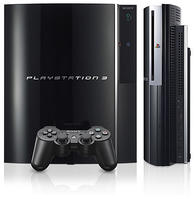
We can’t deny that PS 3 is the most value and powerful Blu-ray player, while at the same time some defections could not be ignored either. It does not support some rare video file formats, such as MKV, MOV and RMVB which indeed brought much trouble considering the conversion process. The high price counts as another factor. After getting the PS3, you can’t help feeling that SONY takes measures to cut manufacturing costs on this device. Host seems not strong enough, especially the drive in the fuselage top used to load Blu-ray Disc, the power button and the pop-up button feels even weak. So have you considered some Blu-ray Player Softwarewith same high quality but acceptable price?
Honestly speaking, most of us tend to focus on the first brand in a particular industry. Not only lies in its leading position, but also with the development of technology, this product grows more mature. Mac Blu-ray Player is such an exactly one. As the first Blu-ray Player on Mac&PC in the world, it always keeps the dominant role with enhanced features and functionality. Furthermore, it could act as a universal media player, able to play any format of movie, video, audio, music, and photo and adding DTS5.1. Apart from Blu-ray Disc, Blur-ray ISO files, and BDMV folders, Mac Blu-ray Player can also play DVD, Video CD, MOV, MKV, AVI, FLV, WMV, MP4, MPEG, RMVB, MP3, WMA, AAC, AC3, etc which just make up for the deficiency of the PS3. And I thought its favorable price $39.95 on official website help a considerable part of people make the choice.
As I am concerned, PS 3 comes out as a game console after all, so if you are a professional game player and consider Blu-ray movies as an alternative, PS 3 is absolutely the best target; while if you are a die-hard fan of Blu-ray super audiovisual enjoyment, Mac Blu-ray Playercould always surprise you.

3/12/2013

Best Blu-ray Drive and Blu-ray Player Software for Mac and Windows

What is Blu-ray Drive?
Optical disc drive (ODD) is a disk drive that uses laser light or electromagnetic waves within or near the visible light spectrum as part of the process of reading or writing data to or from optical discs. According to the types of optical media, the optical disc drive can be divided into "CD" "DVD", or "Blu-ray", followed by "drive", "writer", etc.
Blu-ray Drive, as its name implies, is an optical disc drive that is specially designed to play Blu-ray Disc, a high-definition optical disc format with great dentisy. So far, all Mac and Windows-based PC haven't  ship with Blu-ray drive for one reason or another, so they couldn't access to the Blu-ray Disc. Therefore, there are plenty of Blu-ray drives coming into the market. Here will share some reviews about some Blu-ray Drive, hoping to provide some references for users.

It can get all the power it needs from a USB connection so there is no hassle of power cables. The Samsung Blu-ray RW supports both PC and Mac systems, as well as multimedia Television (if it has a USB input). Its price is $93.40.
With USB 3.0. Magic Cinema technology, extreme 12X Blu-ray writing speed enables Blu-ray 3D entertainment, and its Diamond Shape realizes aesthetics of technology. Its price is $139.99.
No.3 Aluminum External USB Blu-Ray Player/DVD/CD Combo for Apple--MacBook Air, Pro, iMac, Mini
Cladding in a beautiful aluminum casing, it uses a high performance Panasonic drive inside which plays Blu-ray disc, and reads & writes DVD and CD. Please note that package cannot play blu-ray movie or read blu-ray disc, unless it works with software for Blu-Ray playback, so you need to download or purchase additional 3rd party Blu-ray player software for Mac or PC. Also, the Blu-ray Combo drive does not have capability to burn Blu-Ray disc. Its price is $78.99.
What is Blu-ray Player Software?
Blu-ray Player Software is a Blu-ray media library application designed to play Blu-ray discs, BDMV folders and Blu-ray ISO files on the computers running the Microsoft Windows and Mac operating systems. Depending on the computer operating system it runs on, the Blu-ray player software is divided into two general categories: Mac Blu-ray player and Windows Blu-ray player. All of them include a large number of decoding and encoding libraries to read Blu-ray information, remove Blu-ray protection and support Blu-ray playback. It should work together with Blu-ray drive, when you want to play Blu-ray Disc. The best-in-class Blu-ray player software includes VLC media player, MPlayer, Mac Blu-ray Player, Windows Blu-ray Player, Windows Media Player, DVDfab media player, PowerDVD, etc.
Here I would like to recommand two brilliant Blu-ray player Software to all users for references.
No1. Mac Blu-ray Player
As the world's very first and best Blu-ray player software for Mac OS X, Mac Blu-ray Player is designed to play all Blu-ray Discs, Blu-ray ISO files, or Blu-ray (BDMV) folders on all Mac models - MacBook Pro, Air, Mac mini, iMac, Mac Pro with OS 10.5 to 10.8. Also you can use this amazing Bl-ray media player software to play Blu-ray or videos of other media formats on iOS devices, such as iPhone, iPad, iPad min, and i Pod touch, just by enabling its build-in AirX function. Featuring friendly UI, high definition up to 1080p, dts stereo, SNS sharing, universal media performance, and many other great functions, Mac Blu-ray Player can allow you to access fantastic Blu-ray enjoyment.

No. 2 Windows Blu-ray Player
Windows Blu-ray Player software is an autstanding Blu-ray Player for Windows-based PC, which can perfectly play Blu-ray Disc, Blu-ray ISO files, or Blu-ray (BDMV) folders on all popular Windows operating systems, such as Windows XP (SP2 or later), Windows Vista, Windows 7, and Windows 8. Apart from Blu-ray, the universal performance of Windows media player also refers to DVD, VideoCD, MOV, MKV, AVI, FLV, WMV, MP4, MPEG, RMVB, MP3, WMA, AAC, AC3, etc. 1080p HD and dts7.1/5.1 supported, Windows Media Player will present you a fantastic Blu-ray experience on Windows.

3/05/2013

Apple TV and Airx TV of Mac Blu-ray Player

Apple TV is a digital media receiver created by Apple Inc., which is designed to play digital content from the iTunes Store, Netflix, Hulu Plus, YouTube, Flickr, iCloud, MLB.tv, NBA League Pass, NHL GameCenter, or any Mac OS X or Windows-based computer running iTunes on a high-definition widescreen television.

AirX is a fantastic function of Mac Blu-ray Player software developed by Macgo Inc. Unlike Apple TV, AirX can stream Blu-ray, DVD, or videos of other media formats from Mac computers to iOS devices, such as iPhone, iPad mini, iPad, and iPod touch (itouch).

Mac Blu-ray Player is the world’s first Blu-ray Player software as well as the best all-in-one media player for Mac and PC. It supports both Mac and Windows systems. All of the Blu-ray Disc, Blu-ray files, and Blu-ray folders (BDMV folders) can be perfectly played on MacBook Pro, Air, Mac mini, iMac, Mac Pro with OS 10.5 to 10.8. Up to 1080p and DTS 7.1/5.1 supported, it can provide an audiovisual output with high quality. What’s more. The convinient utility of Mac Blu-ray Player allows you easily to transfer Blu-ray, DVD, or other videos from Mac to your HDTV just by a clicking  and dragging. The entire process is easy to practice without any codex or plug-in.


Please visit its official website to get more information about the amazing Mac Blu-ray Player software: http://www.macblurayplayer.com/

3/03/2013

Best Cinavia Solution provided by Mac Blu-ray Player

What is Cinavia?
Cinavia is an analog watermarking and steganography system, developed by Verance, firstly named Verance Copy Management System for Audiovisual Content (VCMS/AV). Even recoded or recorded, it still cannot get rid of Cinavia protection, which can still be identified through professional devices.
Cinavia technology is used in Blu-ray players to detect and limit copies of movies, television shows, and other professionally produced videos that have been made without the permission of the copyright owner.
How does it work?
The protection has two elements which interacted with each other. One is the watermark embedded in audio-video content, the other is the Cinavia enabled player that will detect the watermark. When media with the watermark embedded in the audio track is played on a system with Cinavia detection, its firmware will detect the watermark and check whether the device it is running on is authorized for that watermark or not. If the device is not authorized, it will present a message indicating that the media is not authorized to play on the device, therefore, users should visit the Cinavia web page for more information. Depending on the device and firmware, the audio may be muted, or playback may stop entirely, as long as the message is triggered.
Mac Blu-ray Player
Mac Blu-ray Player is the first Blu-ray player software for Mac OS X and Windows. It can successfully play Blu-ray Disc protected by AACS, BD+, but also supported Cinavia technology. Via this Blu-ray player software, you can easy play Blu-ray Disc, Blu-ray ISO files, or DVD, with 1080p and 5.1/7.1 stereo audio.
For users' references, here list some discs that contain Cinavia protection and players that have detectors for it.
Blu-ray discs:
Title
Studio
Release
Cinavia
The Losers
Warner Brothers
Jul 20, 2010
English track only
The Karate Kid
Sony
Oct 5, 2010
most of the tracks
The Other Guys
Sony
Dec 14, 2010
English track only
Resident Evil: Afterlife 2D
Sony
Sony, Dec 28, 2010
English track only
Resident Evil: Afterlife 3D
Sony
Sony, Dec 28, 2010
English track only
Salt
Sony
Dec 21, 2010
English track only
The Social Network
Sony
Jan 11, 2011
English track only
Takers
Sony
Jan 18, 2011
English track only

Blu-ray/DVD/media players integrated with Cinavia:
Manufacturer
Model & Firmware
Macgo
Mac Blu-ray Player (upd: 1.1v or higher)
CyberLink
PowerDVD 12 (upd: 1905c or higher)
Corel
WinDVD 10/11 [NOT ACTIVATED YET]
Nero
TotalMedia Theatre 5 (upd: 172 or higher)
Arcsoft
TotalMedia Theatre 5 (upd: 172 or higher)
Sony
Playstation 3 (fw: 3.10 or higher)
Samsung
BD-Dxxxx Series BD-Exxxx Series
Philips
BDP5200, BDP6000 (fw: 1.42 or higher)
Pioneer
BDP-V6000
Marantz
UD5005 UD7006
LG
BDP550 (fw: 8.31.283.C)
Denon
DBP-1611UD (fw: MCU Ver 100/07.04.2011) [NOT CONFIRMED] DBP-2012UDCI
OPPO
BDP-103
DBP-105
For more information about the functional Mac Blu-ray Player software, please visit http://www.macblurayplayer.com

10/18/2012

Mac Blu-ray Player software gives away great welfare on Halloween


Straddling the line between fall and winter, plenty and paucity, life and death, Halloween is a time of celebration and superstition.  It is thought that Halloween have originated with the ancient Celtic festival of Samhain, when people would light bonfires and wear costumes to ward off roaming ghosts. While Mac Blu-ray Player also chooses this right time to benefit all Blu-ray users with delectable discount.


Ahead of this mysterious holiday’s coming, Mac Blu-ray Player as the first and best Blu-ray Player software perfects itself into a new V2.6.0 shipping with great promoted functions such as supporting new Blu-ray drive playback. Blu-ray is officially a "bag of hurt" no more for those who wants to take advantage of the high-end optical media format on the Mac considering the Blu-ray Player software makes it available now. Adding its Supporting 1080p and DTS audio system, a HD Blu-ray movie entertainment is absolutely necessary feast for Halloween.

Here are several films deserving to appreciate.

1978 was the year that the world was first introduced to the Halloween movies with the release of John Carpenter's original Halloween film. To date there have been 10 Halloween movies in the series, 8 films to start with (of which Jamie Lee Curtis starred in both the first 2 and the last 2), and then 2 further films as Rob Zombie chose to reboot the series in the 2000s. The following is a full list of all the films in the series thus far:

- Halloween (1978)
- Halloween II (1981)
- Halloween III: Season of the Witch (1982)
- Halloween 4: The Return of Michael Myers (1988)
- Halloween 5: The Revenge of Michael Myers (1989)
- Halloween: The Curse of Michael Myers (1995)
- Halloween H20: 20 Years Later (1998)
- Halloween: Resurrection (2002)
- Halloween (2007)
- Halloween II (2009)


Halloween (1978) Movie Review
At a very young age, young Michael Myers shows his evil nature as he commits murder in his hometown of Haddonfield, and we're then taken 15 years on as his doctor, Dr. Sam Loomis, is desperately trying to convince everyone that Michael Myers is pure evil and should never be allowed free. Unfortunately for Dr. Sam Loomis however, no one really seems to take his concerns too seriously and it's not long before Michael Myers is able to escape; Dr. Sam Loomis suspects that Michael Myers is making his way back from Smith's Grove Sanitarium towards Haddonfield, again he's unable to convince others of Michael's plans however and has to take things upon himself in order to try and track Michael Myers in his journey home.

Halloween H20 (1998) Movie Review
It's been 20 years since Michael Myers last showed his face, Laurie Strode still worries that he could one day return however, and is scared that he'll choose the 20th anniversary of his original attack to try and once again come after her. Laurie's son tries to convince her that she's just being stupid, Laurie isn't so sure however, remaining anxious that herself and her family are in danger on Halloween night, and that Michael Myers may just take the opportunity to once again pounce and come after her in his quest to kill.

Halloween: Resurrection (2002) Movie Review
Whilst this isn't one of the best Halloween films, it is certainly a film that to be a lot of fun. The film really doesn't take itself too seriously; it's fun to watch, a silly teen horror movie, but also extremely self aware.
Jamie Lee Curtis appears in the early part of the film, after this however it's onto Busta Rhymes, Tyra Banks, and Thomas Ian Nicholas amongst others in order to try and keep things interesting, and they do a good job of it. Halloween Resurrection is certainly not up there with the original as a classic of its genre, it is however a fun way to pass 94 minutes though, and is a film that is definitely recommend watching at least the once.


Besides watching horror films, Typical festive Halloween activities include trick-or-treating (also known as "guising"), attending costume parties, carving pumpkins into jack-o'-lanterns, lighting bonfires, apple bobbing, visiting haunted attractions, playing pranks, telling scary stories and so on.

 
© Mac--leaders
All rights reserved